Giffgaff is a virtual network operator (MVNO) in the UK, favored by many users for its support of long-term number retention. Early Giffgaff only offered physical SIM cards, but now supports eSIM, including:
- Physical SIM to eSIM conversion
- Direct eSIM application
However, it's important to note: Giffgaff does not provide traditional eSIM QR codes. Instead, it directly pushes the configuration profile to the device through its official app. Therefore, if your device does not natively support eSIM (e.g., some China-specific models or older devices), you will not be able to apply normally.
This article introduces a solution: using an Android device + lsposed + HookEuicc module to spoof eSIM support on your device, thereby obtaining an eSIM activation code.
Important Notes Before You Begin:
Some applications detect if they have been hooked or if their signature has been tampered with. Signature detection can only be bypassed with root access and hooking, not with a rootless solution like LSPatch. For hook detection, currently, only Xiaomi Redmi systems (MIUI and HyperOS) can install the xiaomi esim lpa module to resolve this (root is also required).
Here is a root tutorial for some models, you can click here to jump.
Additionally, for the Giffgaff operator, this method is currently only applicable in the following scenarios:
✅ Applicable Scenarios
- New SIM card users
- Original SIM / eSIM can still receive SMS normally (for verification during SIM change)
❌ Inapplicable Scenarios
- Original SIM card is invalid and cannot receive verification codes
Giffgaff New Rules (MFA Update)
Giffgaff has recently strengthened its security verification:
- SIM Change Operation: Must use the old SIM to receive SMS verification codes (email is not accepted).
- Lost Card Replacement: Only supports replacing with a physical SIM card, direct eSIM conversion is not supported.
Simple Summary:
- New SIM: You can use the method in this article directly.
- Old SIM still usable: You can switch to eSIM.
- Old SIM unusable:
→ First, bind an unactivated blank SIM card.
→ Then, proceed with the eSIM conversion.
Main Content Begins
Required Software
- HookEuicc (Mandatory)
- Lspatch (Recommended) (Not needed if rooted)
- eUICC Probe (For detection)
- Giffgaff Official App (Download yourself)
Check Status
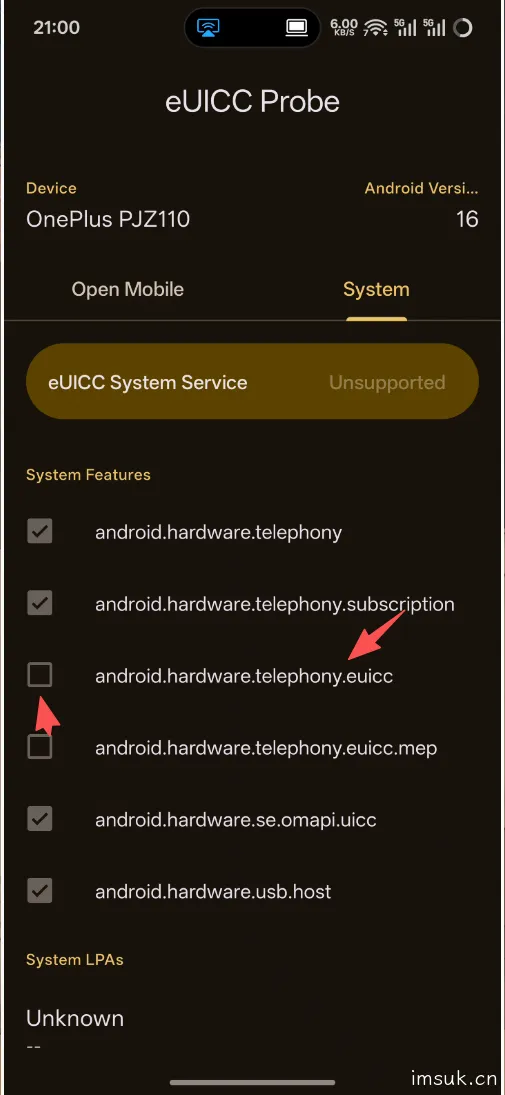
Install and open eUICC Probe
- Check for
android.hardware.telephony.euicc - It should be Disabled under normal circumstances
Inject HookEuicc
Install lspatch and hookeuicc, then open the LSPatch management page.

Click the plus sign, choose a location you can remember, and after selecting, two options will pop up. Choose Select installed applications here.
Find euiccprobe, click on it, select integrated mode, click embed module, and also select Select installed applications, find hookeuicc and select it, then click save.

Click start patching. When it's done, it will look like this:
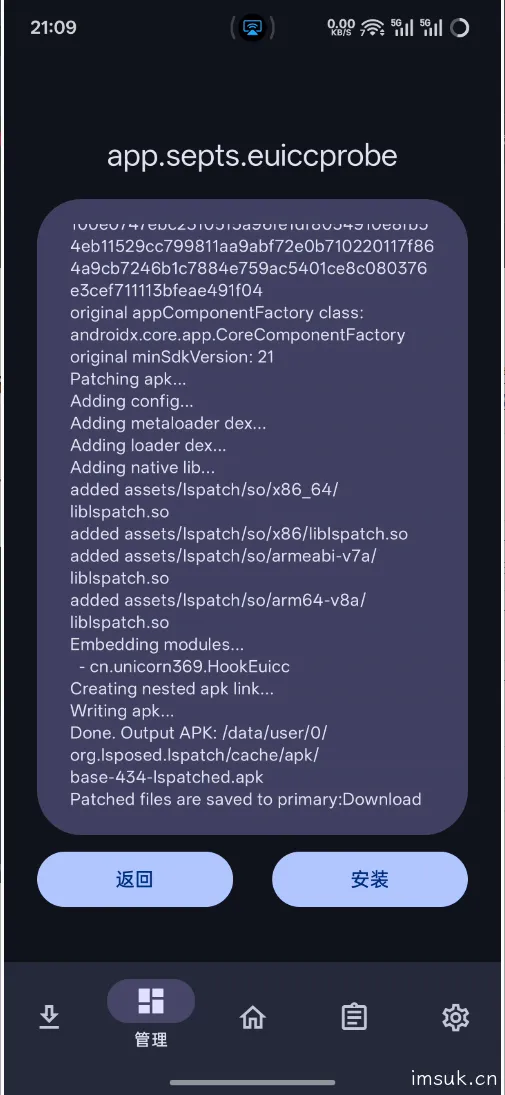
Don't rush to install. Go to your desktop, uninstall euicc probe, and then install it again. Otherwise, it will fail to install due to signature verification failure.
Re-verify Status
Open euicc probe. Crashing is normal. Tap a few more times and be patient, and it will open.
You will be surprised to find that the previously closed android.hardware.telephony.euicc is now open.

Inject into giffgaff
The operation is the same as before, just change the application to giffgaff.
I provide a pre-embedded version here, but I cannot guarantee its usability. Everyone's phone is different. If you cannot enter the app, try using a VPN or try a few more times.
Purchase eSIM
Follow the official process to register or log in to your account.
After entering the homepage, check if there is an eSIM menu.
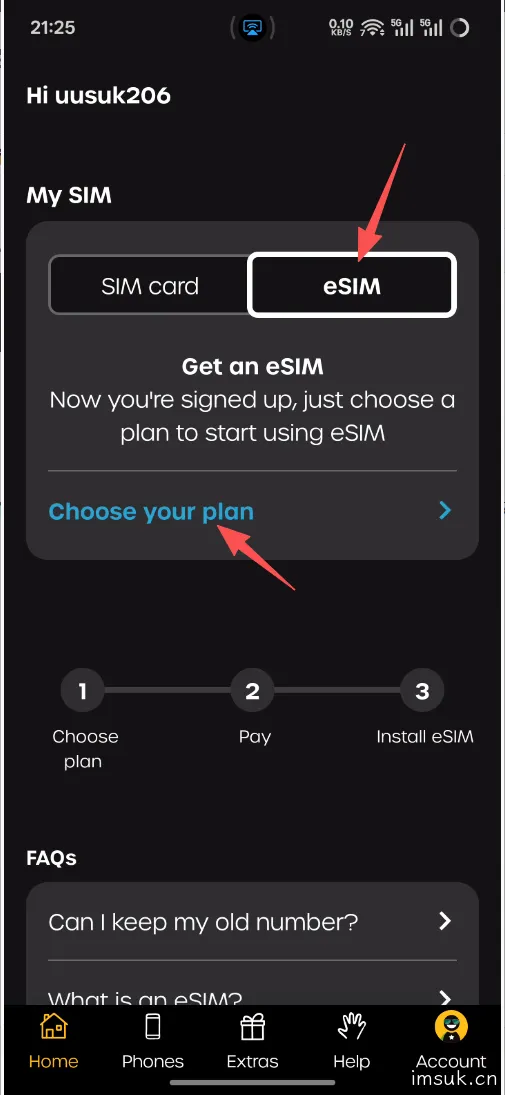
If there is, congratulations, you have completed 99%. Click Choose your plan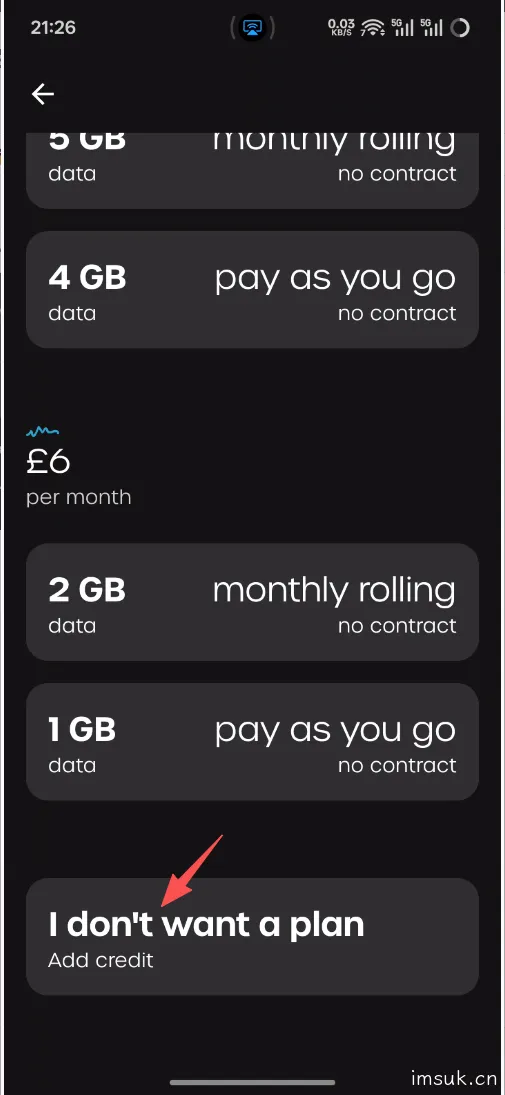
Scroll down to find the last option, I don't want a plan, click Continue, check if it is £10, and click Continue.

Choose your preferred payment method and click the final I understand and agree.
Then proceed to the payment process. I shouldn't need to explain this, right?
Obtain Activation Code and Concatenate
Since I tried it once before but forgot to take screenshots, I can only provide text here.
After you complete the payment and the deduction is successful, a sharing menu will usually pop up. You can forward it to WeChat first, then copy this string: 1$xxx.ondemandconnectivity.com$xxxxxx
Then add LPA: in front of it.
The final result should look like this: LPA:1$xxx.ondemandconnectivity.com$xxxxxx
This is your activation code. Find your eSIM tool, such as nekokoLPA, click the plus sign, and paste your complete activation code. It will automatically download for you.
!!! Read the reminder below first to avoid unnecessary charges !!!
!!! Read the reminder below first to avoid unnecessary charges !!!
!!! Read the reminder below first to avoid unnecessary charges !!!
After enabling eSIM, I don't know if it's a bug or something, but nekoko will not read the card. In this case, just re-insert and remove the eSIM card. If you receive a text message from giffgaff, it means you have successfully activated giffgaff.
Additional Steps for Replacing SIM (if applicable)
Path:
Account → SIM → Replace my SIM → Switch to eSIM
⚠️ Note: You must use the original SIM card to receive the verification code.
Reminder
Avoid Unnecessary Charges
To avoid unnecessary charges, Android users need to disable "Find My Device," and Apple users need to disable iMessage and FaceTime. These services will automatically send a text message, thus incurring charges. Therefore, it is recommended to use a backup phone.

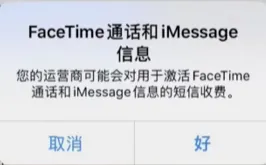
At the same time, turn off mobile data first, connect to WiFi or choose your own SIM card.
Number Retention Rules
According to Giffgaff's official statement, to retain your number, you need to have a balance change every 180 days, which can be a top-up or a consumption. It is recommended to consume by sending text messages. One text message costs 0.3 pounds, and 10 GBP is approximately 30 years. It is recommended to set a reminder to renew every 150 days, and do not set the time too strictly.
How to send a text message
Open your messages, enter `0086` followed by your phone number or `+86` followed by your phone number as the recipient. Regardless of whether it arrives, as long as you see the Giffgaff deduction successful notification, you have successfully extended your number's life.
File Download
As usual, just leave a comment in the comment section to get all the files used in this article.
[hide]Click here to download[/hide]


15 comments
感谢分享
还不错滴!学生卡!打卡时间:13:14:02,请上车的乘客系好安全带~
礼貌取件
1
礼貌取件
学习
学习下,谢谢
学废了,找到方法了
牛逼
写得不错
自己弄得giffgaff app伪装失败,来试试!
评论区来袭
礼貌取件
111
写的很好,但是安装的过程中giffgaff app识别一直失败,想来下载试试