Today I originally wanted to write code well, but I was mentally broken by two software programs right at the start: Postman wouldn't open, Soda Music kept crashing, and I couldn't even install the Visual C++ runtime. After fiddling for a long time, I finally discovered that the Codex sandbox was causing the trouble. I'm documenting the pitfalls and the solution process to help others who encounter similar problems avoid them.
I. Problem Outbreak: Software Collective Strike
This morning, I opened my computer and habitually clicked on Postman, only to be directly greeted by a JavaScript error:
Uncaught Exception:
Error: ENOENT, node_modules/native_modules/build/Release/watcher.node not found in ...
I thought it was a Postman-specific issue, so I uninstalled and reinstalled it, but it was still the same. I then clicked on Soda Music, and it also crashed directly to the system tray, not even showing the startup interface.
At this point, I realized it might not be an individual software problem, but rather an issue with the system environment.
II. Preliminary Investigation: VC++ Installation Failure
Since many desktop applications rely on Visual C++ Redistributable, I downloaded the latest version from the official website. However, the installation failed with an error:
Setup failed
One or more issues caused the setup to fail. Please fix the issues and retry the installation.
Error code: 0x80070656 - Error opening installation log file. Verify that the specified log file location exists and that you can write to it.
I tried to manually open the log file, and Notepad displayed it normally.
It was then that I realized: it's not that I don't have administrator privileges, but that something is restricting my ability to write files.
III. Finding the Culprit: Codex Sandbox Permission Interception
I suddenly remembered that I had just installed Codex yesterday and clicked confirm on the Sandbox without looking at it.
https://docs.onlinetool.cc/codex/docs-zh/sandbox.html
- The log file that the Visual C++ installer writes to the Temp folder.
- The native module (watcher.node) that Postman loads on startup.
- Soda Music's startup files.
These operations were all blocked by the sandbox's permission restrictions, directly preventing the software from running normally.
IV. Solution Steps: Restoring Permissions
1. Open File Explorer
Navigate to C:\Users\Administrator\AppData\Local\. Replace 'Administrator' with your username. Find the 'Temp' folder, right-click, and select 'Properties'.
2. Restore Permissions
Click on the 'Security' tab, find your username, click 'Edit', and enable 'Full control'.

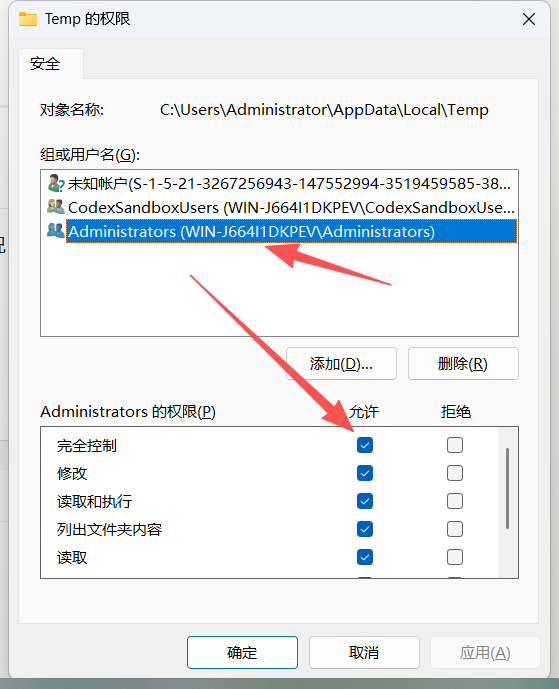
Finally, click 'OK' repeatedly.
3. Restart Software to Verify
After completing the above steps, restart Postman and Soda Music. Both can now be opened normally, and the previous errors are gone.
V. Summary and Pitfall Avoidance Advice
The core of this problem was overly strict sandbox permission restrictions, which prevented applications relying on system files from running correctly. If you encounter a similar situation, consider the following troubleshooting steps:
- Check the error message first: If it indicates "file not found" or "permission denied," prioritize checking if any security software is intercepting.
Although security software can protect the system, it can sometimes become a "pig teammate". When encountering problems, think more about whether it is causing trouble, and you can often avoid many detours.
If you have encountered similar sandbox permission issues, you are welcome to share your experience in the comment section~