A while ago, the author of XBoard released a new project:

https://github.com/cedar2025/Xboard-Node

On the surface, this project is just a new node backend, but it actually solves a crucial problem: allowing node programs to run stably in Docker containers.

If you've used V2bX or similar solutions before, you've probably experienced this: nodes generally depend on the host environment, and running them in a container is either troublesome or unstable. This has also led to node deployment always being strongly tied to VPS.

The emergence of Xboard-Node essentially "containerizes" the node completely. The node no longer depends on a specific machine but becomes a service that can run anywhere.

The change brought about by this is not just convenient deployment, but a shift in thinking.

Since nodes can run with Docker, theoretically, any place that provides a container runtime environment can be used as a node.

Thus, a very natural direction emerges:
Use free container platforms to run nodes.


I. Why This is Feasible

Let's break down the logic:

  • Xboard-Node: Provides a "containerizable node program"
  • Container Platform: Provides "runtime environment + public network egress"

After combining the two:

Node = A container instance that can be deployed at any time

This means:

  • No longer dependent on VPS
  • Can be created/destroyed at any time
  • Can be deployed dispersedly

This makes "low-cost backup nodes" possible.


II. Brief Explanation of ClawCloud Run

ClawCloud Run is used here.

You can think of it as an online runtime environment that supports Docker:

  • Can directly deploy container images
  • Provides a free tier of $5 per month
  • IP belongs to Alibaba Cloud, a domestic manufacturer (high stability)

This is sufficient for a node.


III. Overall Structure

The structure of the entire solution is as follows:

Xboard Panel

Xboard-Node (Docker)

ClawCloud Run (Runtime Environment)

The process is also relatively simple:

  1. Panel creates a node
  2. Get node\_id / api\_key
  3. Deploy container platform node
  4. Fill in parameters and go online

IV. Register ClawCloud Run

1. Registration

Currently, as long as your GitHub account has been registered for more than 180 days, you can enjoy a free quota of $5 per month by registering through GitHub, without any credit card or other authentication.

Register

Please enter image description

Click "Get Started" in the upper right corner to register an account.

Please enter image description

Here's a translated image, which says that regardless of how you register, you get $5 for the first month. However, if you want to continue using it, you must bind a GitHub account that has been registered for over 180 days. This is actually not difficult; if you've used the internet in the past few years, you probably have one. If not, you can try to find one for sale.

For convenience, I directly chose to log in with GitHub. After registration, select "Skip" to bypass the new user tutorial. Next, we come to the most important step.

2. Check Free Quota

Please enter image description

Click the avatar in the upper right corner, then click "Plan".Please enter image description

Mainly check if the "Monthly Gift" of $5 is displayed. If it is not displayed, please check in Account Setting whether your GitHub account is bound or if your GitHub account has been registered for over 180 days.


V. Deployment Steps

1. Panel Preparation

Create a node in the Xboard backend and obtain:

  • API Address
  • API Key (in System Settings)
  • Node ID (custom node ID)
    It is recommended to use Hysteria2 here. I don't know if it's my operation issue or something else, but stable anytls cannot be used, only hy2 can be used.

    Please enter image descriptionHere, Server Name Indication (SNI), Node Address, and Connection Port can be filled in arbitrarily for now; they will need to be changed later.

    I made a mistake in the image above. The service port must be 8443 here, and the connection port will be changed later.


2. Create Container Service

Find "App Lachunpad" in ClawCloud Run, click on it, and then click "Create a app".

Give it a name, then enter ghcr.io/cedar2025/xboard-node in the Image field.

Please enter image description

Configure the defaults, turn on "Public Access", change the left port to 8443, and the right port to UDP protocol.Please enter image description

Now for the crucial step: set up Environment Variables. Click "Add" on the right.

apiKey=
nodeID=
apiHost=

Please enter image description

Click Add to confirm the configuration, and finally click Deploy Application in the upper right corner if everything is correct.

3. Modify Panel Configuration

Please enter image description

Copy this public address, for example, mine is udp://udp.us-east-1.clawcloudrun.com:39088.

Please enter image description

Then my Server Name Indication (SNI), Node Address, and Connection Port are udp.us-east-1.clawcloudrun.com, udp.us-east-1.clawcloudrun.com, and 39088 respectively. After filling them in, don't close it yet. Click Advanced Settings, and in the TLS tab.

Please enter image description

Select Self-signed Certificate and then fill in the link the same as your node address. Click Save.

4. Verify Deployment

Restart the container in clawcloudrun and then refresh your subscription URL to see if your node appears.

Please enter image description

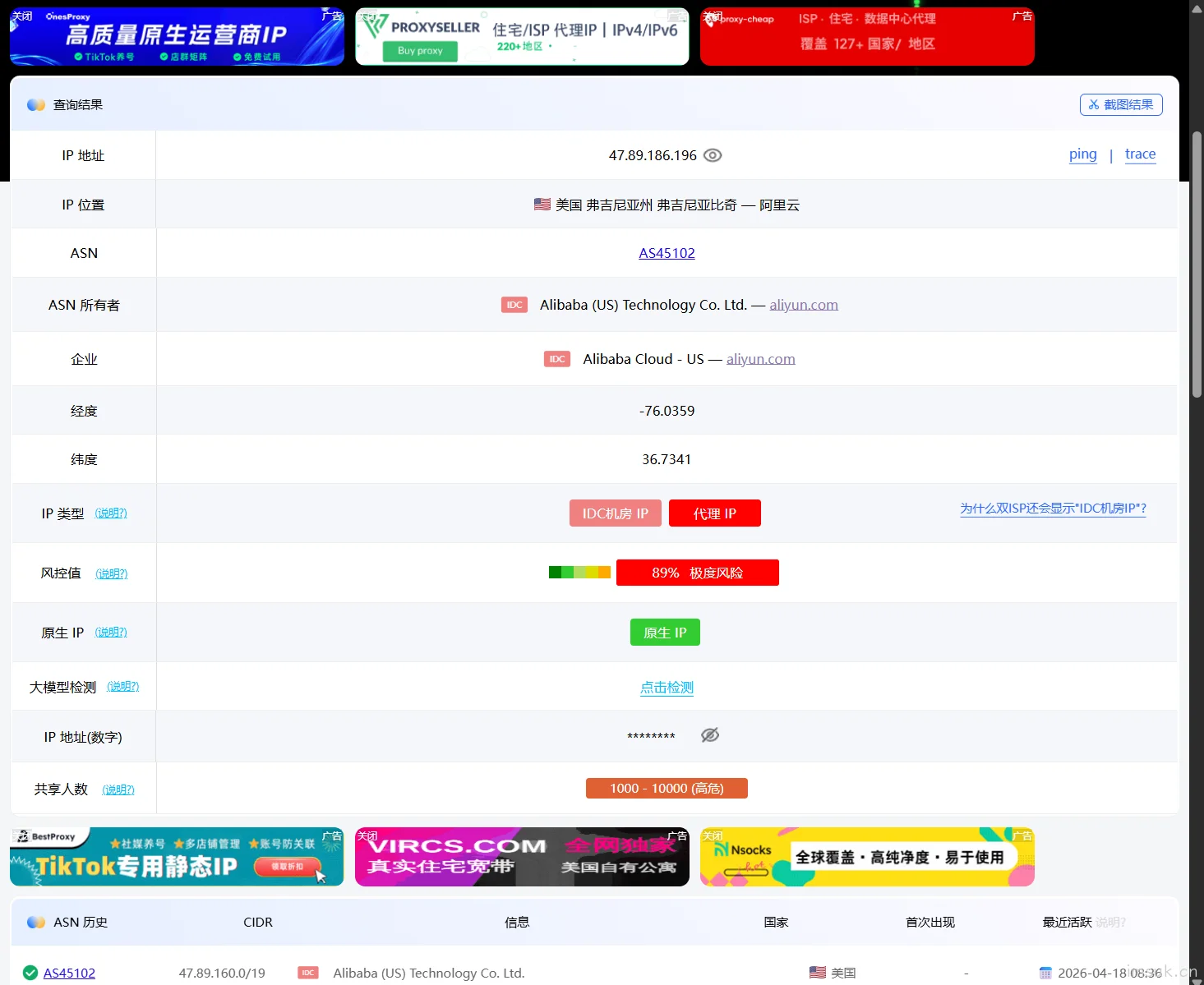
Check if the latency is normal. If you can measure the latency, it's basically successful. Turn on your VPN and visit websites like ip.sb or ping0.cc to check your IP.

Please enter image description

Seeing an IP address from Alibaba Cloud in the US indicates that you have successfully connected to the machine on clawcloudrun. Of course, the IP address is random. If you are not satisfied, restart the container. However, what more can you ask for to prevent disconnection?

VI. Free Quota and Traffic Description

ClawCloud Run is not a "free machine," but rather:
A free quota model charged based on resource usage.
The main sources of consumption include:
  • CPU usage time
  • Memory usage time
  • Network traffic
The most critical of these is:
Traffic consumption is the highest.

Actual Usable Traffic

Based on usage experience:
  • Approximately 10GB per month
The specific value will fluctuate, and it is not recommended to fix it.

Usage Recommendations

It is recommended to combine the following strategies:
  • Use only as a backup node
  • Do not run high traffic for extended periods
  • Control the number of users or limit bandwidth
END

本文标题:用免费容器跑节点:Xboard-Node + ClawCloud Run 实战教程

本文链接:https://imsuk.cn/archives/267/

除非另有说明,本作品采用知识共享署名-非商业性使用-相同方式共享 4.0 国际许可协议

声明:转载请注明文章来源。

Last modification:May 1, 2026
请用钱砸我